
By Erica Browne Grivas
You were drawn to garden design because of your connection to nature. You probably didn't picture yourself debating with chatbots about style or juggling apps to draw, track your time, and make plant lists. But the tools keep multiplying, forcing calculations about where your time and money are best spent.
Here’s how three designers are using—or skipping—technology to manage their workloads.
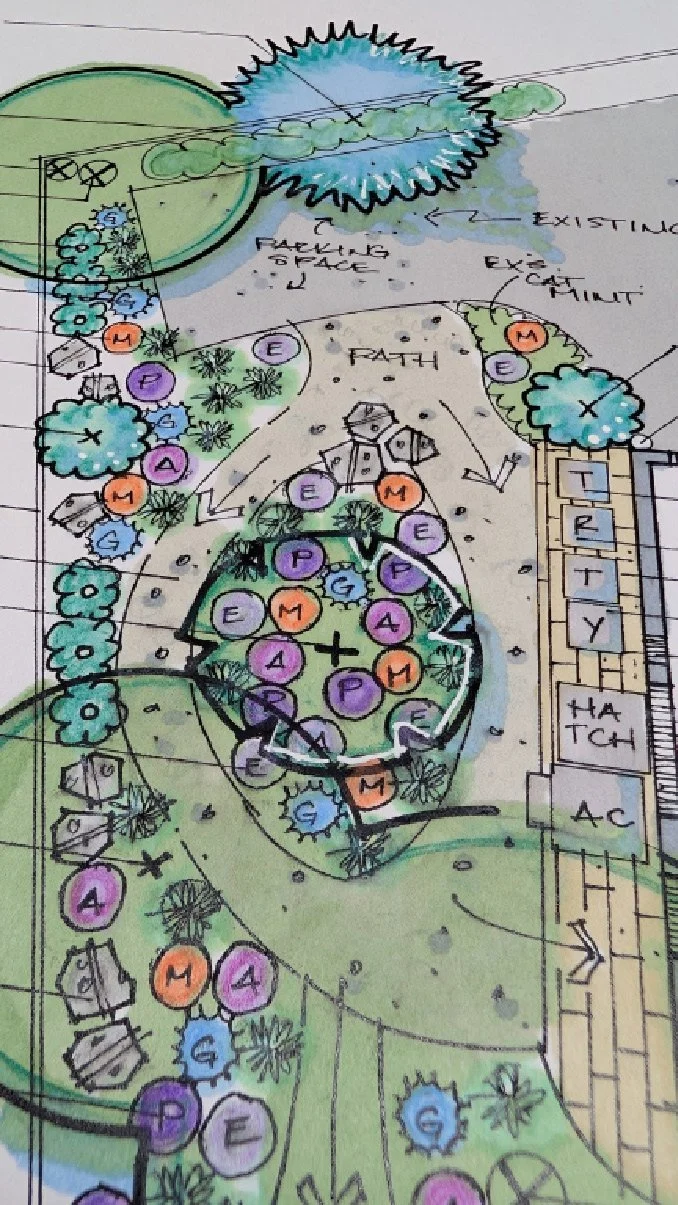
Sara Meier, of Greenthumb SAM, prefers “old-school” drafting that allows her to draw on-the-spot sketches during consults with her own organizational twists. Image: Sara Meier
Drafting — pen, iPad or CAD
One of the most labor-intensive parts of the work, the key question is: how much of the drafting load can technology handle?
Designers are running the gamut here, from pen-and-paper loyalists to early tech adopters.
For her work, designer Sara Meier of Greenthumb SAM in Eastern Washington, prefers the look and feel of graphite on vellum even after 25 years. Her hand-drawn designs are featured in the textbook Plan Graphics for the Landscape Designer by Tony Bertauski.
“I use a T-square and a triangle...I go to the coffee shop and get my prints and draw everything by hand.” She finds that it’s especially helpful for on-site garden consultations, where she’s able to visualize and sketch ideas quickly in plan view “pretty close to scale,” before drawing two options for the client. “I can hand them sketches and notes on-site and that's something they don't have to wait for,” she says.
Meier streamlines her process with custom templates for favorite plants and design elements, sorted by category. Pens are organized by line weight, and she creates color palettes for each project, saving names for reuse. For a look at her process, you can see her time-lapse drawings come to life on Instagram @greenthumbsam.
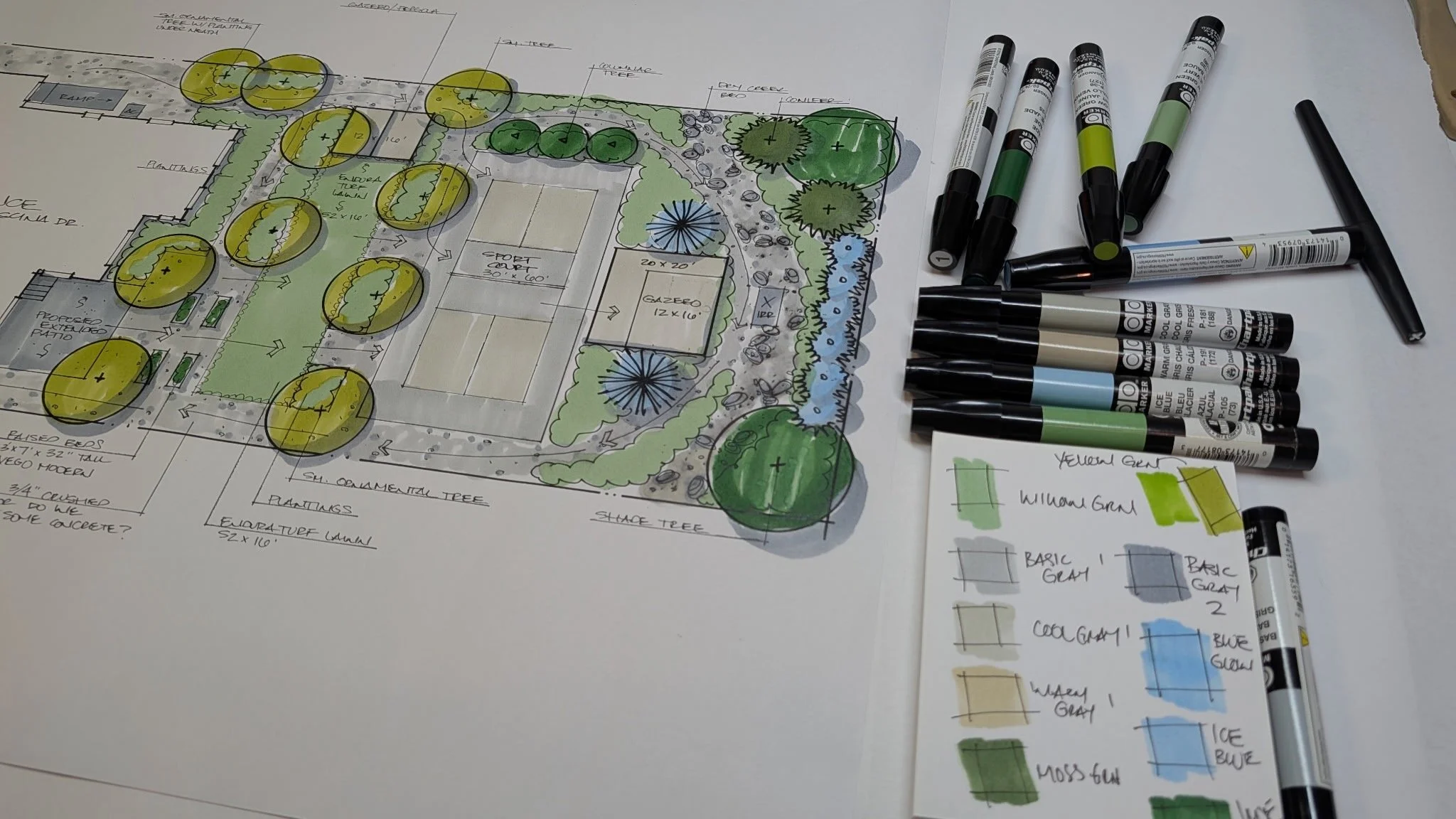
Meier prefers hand-drafting, creating time-saving workarounds like custom templates and project palettes. Image: Sara Meier
Among drafting aids, Morpholio Trace receives high praise from both Henry Gao and Dana Niblack, of Cascadia Landscape Design.
San Francisco–based Gao, an architect trained in the U.S. and Canada, teaches designers to transition from hand-drawing to digital crafting on the iPad, offering masterclasses in Morpholio Trace and Procreate. His website promises, “My courses show you how to draw on digital layers like you would on paper…just faster and more efficiently.”
He uses Morpholio Trace for sketching, testing layouts, and working over uploaded PDFs and site photos, recommending it as the first tool any designer should learn, even ahead of AI.
“It really feels a lot like the traditional tracing paper, except everything here is digital and you can turn layers on and off, copy ideas, and fix mistakes with just a few taps. Procreate is where I make my drawing look finished. This is where I add color, lighting texture, and details that really help the client picture where the space will look like, and it makes ideas much easier to understand.”
Niblack’s firm has created a standard project file in Morpholio Trace preloaded with their title block and plant symbols for fast starts.
“I can copy one of our existing plant symbols and quickly add it to the plan,” says Niblack. “It just saves you a lot of time.” Everything stays on layers, so designs can be copied, adjusted, or tested as options without starting over. Files need to be standard sheet size (i.e., Arch D, 24x36) or dimensions can come out incorrectly at print time, she notes—a mistake that cost one of her team a full redraw.
Since Morpholio Trace’s acquisition by Vectorworks, a 2D/3D CAD software program, a cloud-based file transfer between the two programs has been developed. Niblack has used it on at least one project where she needed CAD-level measurement accuracy for a contractor (a precisely angled backyard in Richmond Beach).
All of Cascadia’s team members moved from hand drawing to Morpholio Trace when the firm began.
Yet despite a background in tech in her first career, she found Vectorworks too steep of a learning curve.
“I've found it really challenging to get productive in this software…I've taken Vectorworks in-person training classes three times and I'm still not ready to go.” She also laments its lack of an asset library. “The time it takes to build plants, furnishings, surfaces, is quite an investment—particularly frustrating when a single license is over $1,000 per year. Since we started our firm, we haven’t had down time to make Vectorworks more efficient than Morpholio.”
Niblack finds PlantMaster invaluable for building plant palettes, generating plant schedules, and producing interactive client microsites. “Can you imagine how long this would take if I were building it by myself?” she says.
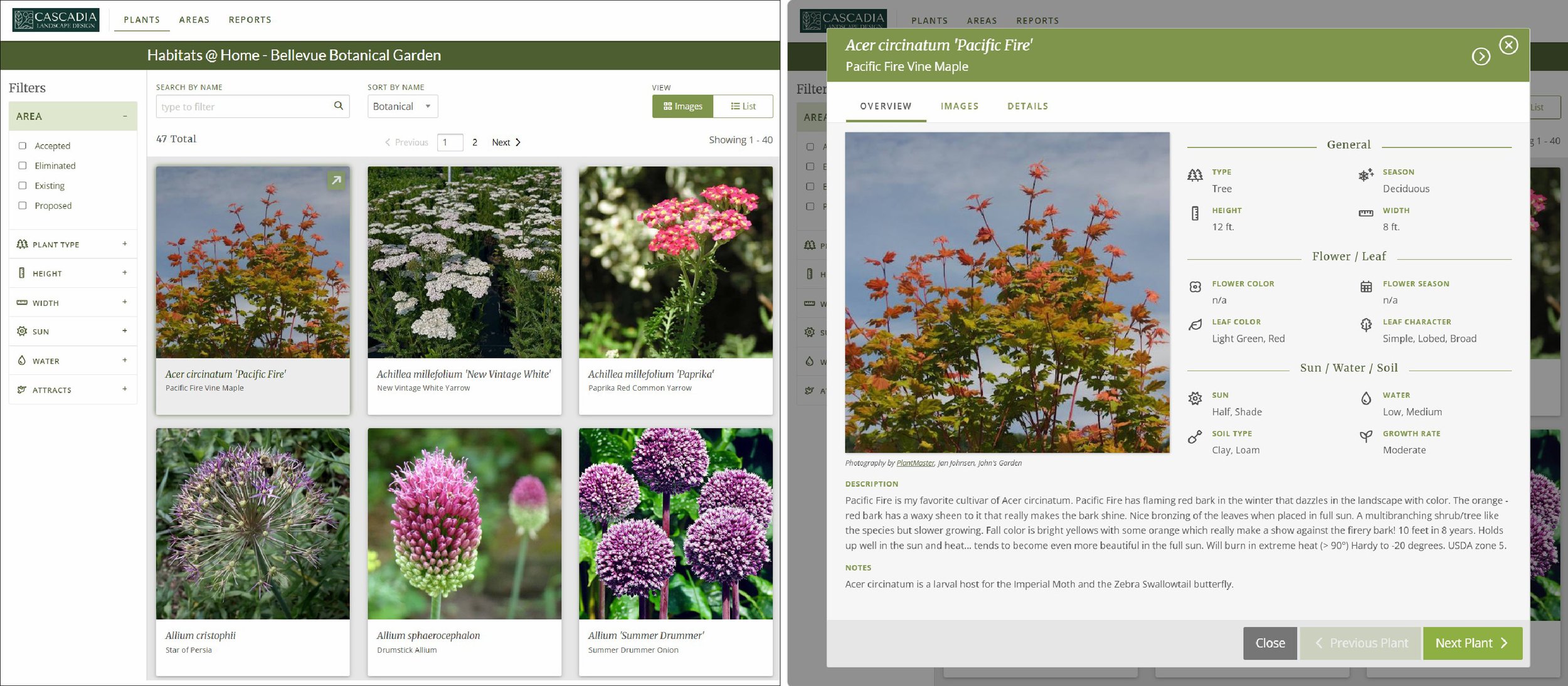
PlantMaster lets designers build custom plant lists that publish as interactive client microsites (left). Clients can click individual plants to view detailed growth requirements, photos, and care notes (right). Images: Dana Niblack, interface courtesy of PlantMaster
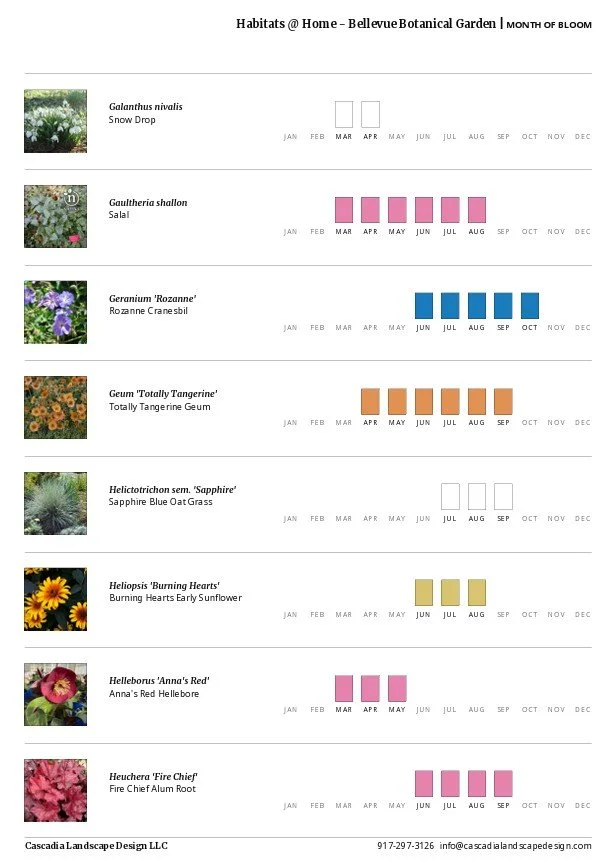
PlantMaster can automatically generate reports like bloom charts (above), water needs and season of interest. Image: Dana Niblack, interface courtesy of PlantMaster
Business operations
To track mileage, Niblack uses MileIQ which detects driving automatically via phone GPS and lets her classify trips as work or personal. It also timestamps start and stop times, functioning as a backup for hourly billing.
“It's timestamping when you're starting and stopping. So just to double check your hours, that's really nice.” Short trips can get missed, however: it doesn't start detecting until a half mile into a drive.
Meier uses Clockify—manual start/stop logging by task, color-coded by client—alongside a paper time sheet kept in each client's physical folder. “It's fantastic,” she says. She, like Niblack, uses QuickBooks for income and expense tracking, handing off to a bookkeeper.
Where AI helps — and where it doesn’t
Gao sketches in Morpholio Trace, then—before rendering the design himself in Procreate—sometimes turns to Nano Banana (a Google Gemini AI model) or Midjourney to explore rendering styles or generate custom assets.
He notes, “I don't let the AI do the design thinking for me or the design. I just use [it] to really spark new ideas,” adding, “AI can't replace good design thinking,” Gao says. “That will always be the most important skill set that designers should have.”
Niblack uses AI-generated notes from introductory client meetings via Zoom or the Granola.ai app (for on-site consultations), then feeds the notes into ChatGPT with a template to draft a personalized follow-up message—cutting writing time from roughly an hour to about 10 minutes. She also checks tone on culturally sensitive client correspondence, for example with a recent client from Vietnam looking to make changes to a property they own near Seattle.
Tools take an investment of time and money to learn. Ultimately, knowing your style and workflow—as well as your client’s needs—is key. Whether that means graphite and vellum, an iPad, or an AI assist, you’re identifying and solving a design problem.
Gao asks, “What is the problem you're trying to solve? Once you know that, it's much easier to pick the right tool.”